Most popular
Online store
Full e-commerce with catalog, cart, and secure payments.
from$3,999
- Product catalog & cart
- Secure card payments
- Inventory & order tools
The public site is half the build. The other half is the admin panel and CRM behind it — where the order lands, the customer record updates, and somebody knows what to do next. We build both, and the payment integration between them.
Three views of one system. Most vendors sell you the first and leave the other two as your problem.
There are two ways to put a shop online. You can rent a platform — a monthly fee, plus a slice of every order, forever — and live inside whatever the template allows. Or you can own the store. We build the second kind, and we are direct about when the first kind is the better buy.
Owning it does not mean rebuilding Stripe. Card data should never touch your server, and in our builds it does not: the processor owns the card, the PCI scope and the fraud checks, by design rather than by accident. What you own is everything that makes the business yours — the catalog, the cart, the checkout flow, the admin, the customer records, and the integration that joins them.
Payment integration is one of our confirmed services, not a step we outsource to a contractor and mark up. The practical difference shows on the day a checkout misbehaves at four in the afternoon: you call the people who wired it, and they can read the code. An agency that subcontracted the payments layer cannot do that, whatever the retainer says.
Every store demo ends at the confirmation screen, which is exactly where the actual work starts. An order is only useful if it lands somewhere a person can act on: fulfilment, refunds, a customer who has ordered four times and should be treated accordingly, a pipeline that shows what is owed and what is late.
So the admin is part of the product, not an afterthought. Inventory and order tools come with every store. Where the operation needs more — roles and permissions, customer history, automation of the steps a person is currently doing by hand, integrations with the accounting or email tools you already pay for — that is the deeper build, and it starts at $12,000.
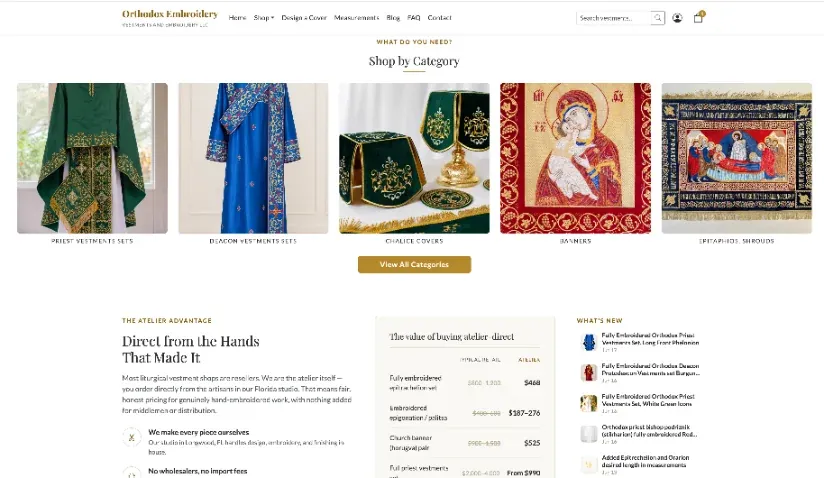
Churchembroidery.net is the clearest example in our own work: an online store on the front, and a CRM with AI assistance and customer-service tooling behind it. One project, one team, one codebase.
Product pages compete for very specific searches, and most stores lose them the same few ways. Descriptions copied from a supplier, so a hundred shops carry identical text. No structured data, so price and availability never surface in the result. Category pages slow enough that people leave before they load. And filter URLs flooding the index with thousands of near-duplicate pages that dilute the ones that matter.
We ship Product and Offer structured data, write real descriptions rather than manufacturer boilerplate, keep faceted URLs out of the index unless they have earned their place, and keep category pages fast. If you also sell to people nearby, the store should be tied to your local SEO — an Orlando shopper searching for something in reach is a warmer search than a national one, and cheaper to win.
Tick what the operation needs. The answer points at a published starting price; the real number depends on catalog size and how much of your process the admin has to carry.
Business website
from $1,099
Nothing ticked yet. If you are not taking money or managing records online, a straight business website is the cheaper, faster build.
Online store
from $3,999
Catalog, cart, secure card payments, and inventory and order tools you can run without calling anyone.
Store with custom admin & CRM
from $12,000
Logins, roles, customer records and the automation that removes the manual steps — built around your workflow, not a generic dashboard.
The parts that make a store sell, and the parts that make it survivable to run.
Structured, fast, and written to be read by customers and search engines.
A short, mobile-first path from product to paid, with no account wall.
Integrated in house and tested end to end before you go live.
Stock, orders and fulfilment tools you can operate yourself.
Who bought what, when, and what should happen next.
Product and Offer schema so price and availability can surface in results.
Configured for how you actually ship, including local collection.
We test the whole purchase path with real cards, then hand you the keys.
We build on a rented platform or from scratch, and we do not have a house preference to defend. The question we actually ask is which costs you less over three years given your catalog, your margins and how custom your operation is.
A rented platform wins when the catalog is small, the process is ordinary, and speed to launch matters more than fees. You get an ecosystem, and somebody else patches the security holes. The cost is the monthly fee, the transaction slice, and a ceiling on how far you can customise before you are fighting the platform.
A built store wins when the fees have grown into real money, when your process needs something the platform will not do, or when the back office is the actual product and the storefront is a formality. It costs more once and nothing per order.
We will tell you which, and why, at the consultation — including when the answer means a smaller invoice for us.
Products, customers and order history all move. The part that decides whether a migration succeeds is unglamorous: mapping every old URL to its new one and putting redirects in place before launch. Stores that skip it lose the search traffic their old product pages had earned, and it is usually blamed on the redesign rather than on the missing redirects.
Two of our shipped projects are festivals. The Georgian Food and Culture Fest site sells tickets; the Slavic Food Festival in Orlando site takes food orders. Mechanically these are ecommerce — catalog, cart, payment, confirmation — but the deadline is absolute and the traffic arrives in a single spike. If you are running an event, say so early; it changes how we test, not just what we build.
We will not store raw card numbers, build a checkout that hides the total until the last step, or add dark patterns that raise conversion by annoying people into buying. They work briefly and then they cost you the repeat customer, which is the only customer with real margin in it.
Client work, live. A full-stack store with its own CRM, and a festival site taking food orders under a hard deadline.



Catalog size and operational depth move the final number more than page count does.
Most popular
Full e-commerce with catalog, cart, and secure payments.
from$3,999
A store with the back office and customer records built in.
from$12,000
Updates, monitoring and support for software with money running through it.
from$99/mo
Not sure a store is the right first step? A business website with a handful of products is often the cheaper way to test demand.
Get a custom quoteBusiness and service websites without a store behind them. From $1,099.
When the login and the workflow are the product, not the storefront.
Technical and on-page SEO for stores that are built but not found.
Tell us what you sell and we'll send a free quote with a realistic scope.
We'll review your project and get back to you within one business day.